Phishing emails slip past most filters by pretending to be someone you trust. They trick you into handing over personal info or clicking harmful links without a second thought. Knowing what is phishing and how to spot phishing red flags can stop these attacks before they hit your inbox. This guide breaks down phishing basics and shows how an opt-in email like OptMsg keeps unapproved senders out of your Inbox.
Understanding Phishing Basics
Start your journey to a safer inbox by grasping the essentials of phishing. This will help you understand the tactics used by cybercriminals and prepare you to fend off their attacks.
What is Phishing?
Imagine opening an email from your favorite store offering a massive discount. It looks legit, but it’s a trap designed to steal your details. Phishing tricks you into revealing sensitive information by posing as a trusted entity. These scams can lead to financial loss or identity theft. By understanding this, you can stay alert and avoid falling victim. Learn more about phishing in depth from Proofpoint’s reference.
Phishing Definition and Types
Phishing isn’t just one type of scam. It has many forms, each with its own tricks. Email phishing is the most common. It aims to gather your data through fake messages. Spear phishing targets specific individuals. The attackers do their homework, making their emails more convincing. Whaling goes for the big fish, like executives. Each type has its own tricks, but they all want the same thing: your data. Knowing these types helps you recognize and avoid them.
Common Phishing Email Tactics
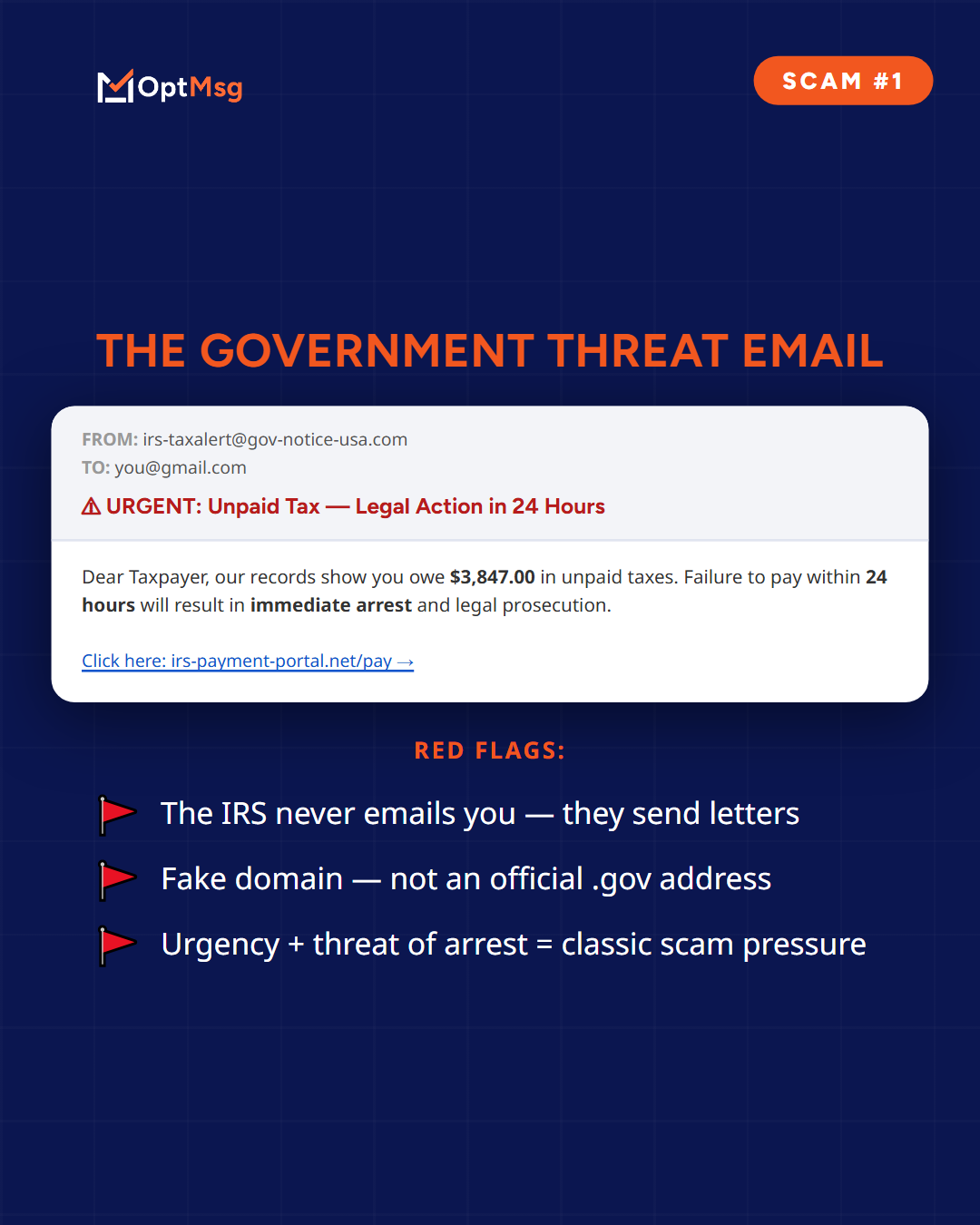
Phishers use tactics like urgency and fear to trick you. They might claim your account is compromised, urging you to act fast. This pressure leads to hasty decisions, like clicking malicious links. They also mimic trusted brands with lookalike websites. These sites capture your login details as soon as you enter them. Verify the source and think twice before clicking.
Spotting and Blocking Phishing Attempts
Now that you know the basics, let’s explore how to spot and block these threats. Recognizing red flags is key to ensuring your email stays safe.
How to Spot Phishing Red Flags
Phishing emails often have telltale signs. Look out for poor spelling or grammar. Legitimate companies usually have polished communication. Check the sender’s email address closely. It might look right at first, but there could be subtle differences. URLs are another giveaway. Hover over links to see their true destination before clicking. These simple checks can save you a lot of trouble.
Spear Phishing, Smishing, and Vishing
Different types of phishing require different defenses. Spear phishing is more personalized, making it harder to detect. Smishing uses text messages instead of emails. Vishing involves voice calls aiming to extract your details. Awareness of these variants helps you prepare better. Question unexpected requests for information, no matter the medium.
Anti-Phishing Tips for Safe Inbox
Here’s how to keep your inbox safe. Avoid clicking suspicious links. Use spam filters to weed out potential threats. Regularly update your software to patch security holes. Additionally, consider using a secure email service like OptMsg. It allows mail from senders you have not approved straight to Trash, cutting down phishing risks. Dive deeper into how OptMsg can help by reading the sections below.
Protecting Your Email and Personal Data
Let’s focus on safeguarding your identity and data. By adopting these strategies, you can build a robust defense against phishing.
Identity Theft Prevention Strategies
To prevent identity theft, limit the information you share online. Use strong, unique passwords for each account. Multi-factor authentication adds an extra layer of security. Monitor your accounts regularly for unauthorized activity. These steps can greatly reduce the chances of your identity being stolen.
Benefits of a Secure Email Service
A secure email service is crucial in combating phishing. It filters out suspicious emails before they reach you. Services like OptMsg offer features like opt-in messaging, meaning mail from senders you have not approved goes to Trash. This drastically reduces spam and phishing attempts, giving you a cleaner, safer inbox.
OptMsg: Your Privacy-First Email Solution
Why choose OptMsg? It’s built with your privacy in mind. With no ads and no data selling, your inbox remains distraction-free. The opt-in system sends mail from senders you have not approved to Trash. This means fewer threats and less spam. Protect your personal data and enjoy peace of mind with OptMsg’s privacy-first approach.
In summary, understanding phishing and taking proactive steps can safeguard your inbox. OptMsg offers a reliable solution to keep phishers at bay. Empower yourself today, and take control of your digital communication.
What Spear Phishing Is, and Why It Works
Most phishing is written once and sent to millions. Spear phishing is written for one person.
A spear phishing email is built from details the sender already knows about you — your employer, a recent purchase, a colleague’s name, a service you use. Those details come from social media, company websites, and information exposed in past breaches.
That is why it works. The message does not read like a scam, because it reads like someone who knows you.
Telling the two apart
- Ordinary phishing is generic — “Dear Customer”, a service you may not even use, small errors in the wording.
- Spear phishing is specific — your name, your role, a real project or purchase, and usually one small urgent request.
The defense is the same for both, and it is not sharper eyes. It is controlling who can reach you at all.
What a Phishing Email Actually Looks Like
An email arrives from your bank asking you to confirm a payment you did not make. The logo is right, the tone is right, and the link opens a page that looks exactly like the login screen you know.
Most phishing messages share a small number of recognisable patterns:
- A request that has to happen immediately — an account closing, a payment failing, a delivery about to be returned.
- A sender address that is close but not quite right — an extra letter, or a different domain after the @.
- A link whose visible text and real destination differ. Hover before clicking and compare the two.
- A request for something legitimate senders do not ask for — a password, a full card number, a code sent to your phone.
- An unexpected attachment, particularly one that asks you to enable content.
Any one of these can appear in a genuine email. Two or more together is the signal.
Common Questions About Phishing
What is the difference between phishing and spam?
Spam is unwanted mail, usually advertising. Phishing is mail designed to deceive you into handing over information or money. Spam is a nuisance; phishing is an attack.
Is it dangerous to open a phishing email?
Opening a message is usually low risk. The risk comes from what happens next — clicking a link, opening an attachment, or replying with information.
Why do phishing emails still arrive when I have a spam filter?
Filters score messages against patterns they have seen before. A well-written phishing email sent from a new domain has no pattern to match yet, so it arrives looking ordinary.
What stops phishing before it reaches the inbox?
Approval. If a sender has to be approved before their mail reaches you, a stranger’s message goes to Trash whether it is well written or not.
Where OptMsg Fits
Everything above is about recognizing an attack after it has arrived. OptMsg works earlier: mail from senders you have not approved goes to Trash, not your Inbox.
That is the Secure side of how OptMsg is built — fewer chances to be deceived, because fewer strangers get through. You can try OptMsg free for 14 days, with no credit card required.