Marcus reads his email standing up. He didn’t decide that; he noticed it. Somewhere in the last few years, “checking email” became a thing he does braced — thumb hovering, eyes scanning for the one message that matters between a shipping notification for a thing that already arrived, a sale on a mattress he bought in 2023, and a newsletter he doesn’t remember meeting.
Here’s the part worth sitting with: none of those senders asked Marcus. They got his address — from a checkout page, a data broker, a “partner” — and from that moment they had the same standing in his inbox as his sister does.
That’s the actual defect. Not volume. Standing.
Your inbox is a to-do list other people write
Every unread email is a small task someone else assigned you: read me, delete me, unsubscribe from me, wonder about me. Filters and folders don’t change that — they just reorganize the assignments. You can spend a Saturday building rules and arrive at a tidier version of the same arrangement: anyone with your address gets to put work in front of you.
The tools industry answer is cleanup — apps that bulk-delete, bulk-unsubscribe, tidy. Cleanup treats the symptom on a schedule. The door stays open, so the pile refills.
There’s a ritual most people will recognize. Once or twice a year you declare inbox bankruptcy — archive everything, unsubscribe from forty lists, promise yourself it will be different. For a week it is. Then a checkout page asks for your email, a conference shares its attendee list, a sender you unsubscribed from relaunches under a new name, and the arrangement quietly reassembles itself. The ritual isn’t failing because you lack discipline. It’s failing because unsubscribing is a request, and the default answers it: anyone who gets the address gets the standing.
What an opt-in inbox actually does
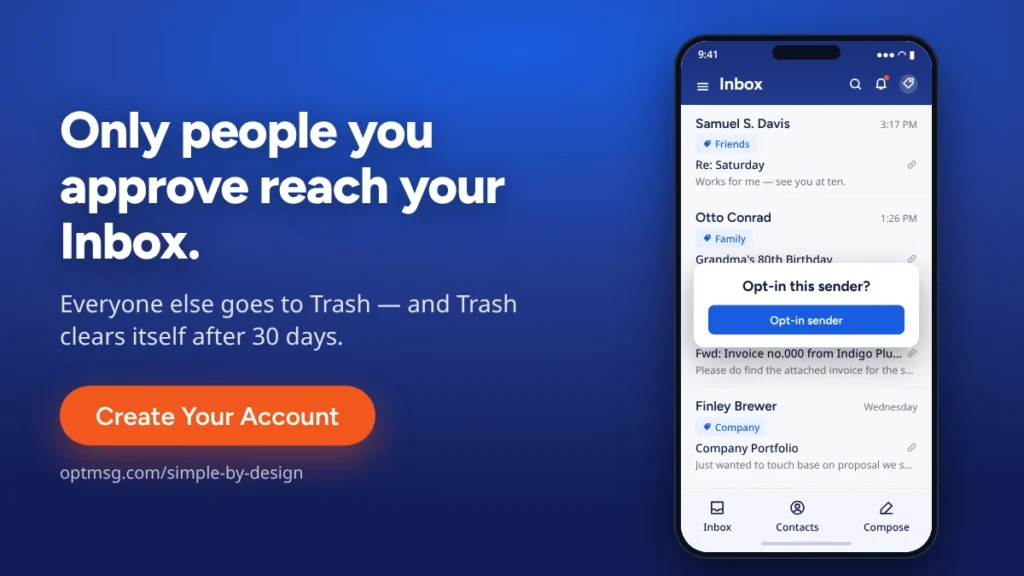
OptMsg’s patent-pending opt-in technology flips the default: your Inbox holds mail from senders you opted in to. Mail from a sender you haven’t approved is still delivered — it goes to Trash, not your Inbox, and Trash auto-deletes after 30 days. Nothing to file. Nothing to unsubscribe from. No decision to make about the mattress company, because the mattress company isn’t on your list.
Notice what that isn’t: it isn’t a smarter filter guessing at what you want. A filter reads the mail and makes a call. Opt-in reads nothing — it just asks one question a filter never asks: did you invite this sender? You decide. That’s the whole mechanism.
In practice, deciding is one tap — the app’s own word for it is “Opt-in this sender.” Approve your dentist once and they’re in your Inbox like anyone else you invited; it takes about as long as deleting one mattress email used to, and you do it once instead of weekly. The work doesn’t disappear — it changes shape, from a recurring chore someone else schedules into a one-time decision you make on your own terms.
“But what if I miss something?”
The honest objection, and it has a real answer. When a message from an unapproved sender lands in your Trash, OptMsg checks whether many other OptMsg users have opted in to that sender as trusted. If so, the message is flagged as a Community Recommendation and you get a push alert that something in your Trash may be worth a look. Pair that with the 30-day window — nothing disappears for a month — and “missing something” stops being the price of quiet. It isn’t spam detection and it isn’t AI guessing; it’s the opted-in choices of real people, surfacing a sender your community already trusts.
It’s worth being straight about the trade. An opt-in inbox asks something the old arrangement didn’t: the first time a sender you actually want writes to you — a new client, a school office, a support thread you started — their message lands in Trash rather than your Inbox, and it sits there, visible and untouched, for 30 days while you decide. That’s the cost: a glance at Trash when you’re expecting someone new. What you get back is every morning afterward — one decision per sender, once, instead of a decision per message, forever.
What tomorrow morning looks like
You open the app. There are four emails. One is your sister. One is your dentist confirming Thursday. Two are newsletters you actually chose — chose, as in tapped “Opt-in this sender” yourself. There is nothing to triage, because triage was the old inbox’s word for doing other people’s filing.
You read them sitting down.
The difference isn’t that less happened in the world overnight. The same newsletters went out; the same sale started. The difference is where it all landed — mail you invited in your Inbox, everything else in a Trash that empties itself. Quiet, it turns out, was available the whole time. It just needed the default turned around.
That’s the product. Not a fortress, not a purge — a door with your name on the guest list. See how Simple by Design works, or read what opt-in email is and how it shields your inbox.
Ready for a quieter morning? Create Your Account.
Your Inbox. Your Rules.
Previous in Privacy Guides: Your Password Was in a Breach Last Month. Your Inbox Shouldn't Care.
Next in Privacy Guides: Gmail Alternatives for People Who Are Done Being the Product