Simple by Design
Stop wasting time on emails you never wanted.
Every day, unwanted emails fill your inbox. You delete them, unsubscribe and block senders. But more keep coming.
No SPAM. Only emails you choose reach your Inbox.
Everything else goes to Trash.
Keep your current email while you switch easily at your own pace.
They send it. You clean it up.
You open your inbox and see 47 emails, and 42 of them are SPAM. By the time you get to the emails you actually want, your coffee is cold and you’ve clicked “unsubscribe” more times than you can count.

Love the coupons. Hate the clutter.
You don’t have to opt in everyone. Leave the stores you shop out of your contacts, and their emails skip your Inbox and wait in Trash. Need a coupon code or have time to browse? It’s there for 30 days. After that, we delete it for you.
No unsubscribing. No daily cleanup.
And you can change your mind anytime.
A simpler morning with OptMsg
7:00 am
Only 5 new emails in your Inbox, all from people or companies you trust.
7:05 am
Already done checking your email and your coffee is still hot.
Once a week
A quick look into Trash for anything new you were expecting. Add that sender to your contacts and their email comes to your Inbox from then on.

Less junk email. Less time wasted.
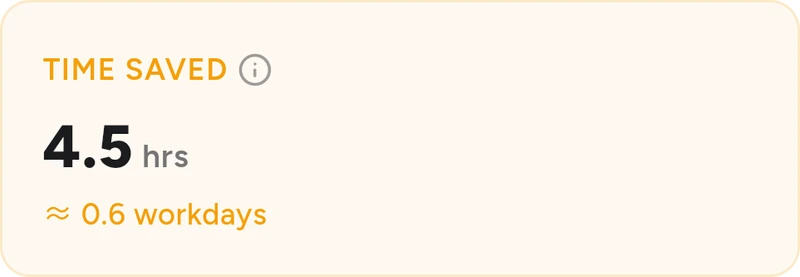
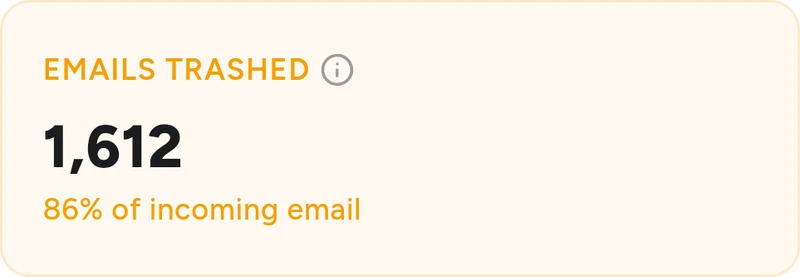
Scorecard from an example account, last 30 days. Time saved is estimated at 10 seconds per trashed email. Your numbers will vary.
Trash takes itself out
Messages stay in Trash for 30 days so you can see and restore them, then they leave your account.
Fewer important messages slip past
Community Recommendations point out trusted senders whose mail landed in your Trash, so you don’t miss messages you want.
Ready for a simpler morning?
In plain words
The details are in our Terms and Privacy Policy. Read the full policy
- ✓Mail from senders who are not in your contacts is placed in your Trash, not your Inbox. Check your Trash for messages you expect.
- ✓Messages stay in your Trash, where you can see and restore them, for 30 days.
- ✓You can delete your account at any time.
Side by side
Questions people ask
How do I get started?
It’s as easy as 1, 2, 3: Sign up and choose your @optmsg.com address. Sync your trusted contacts. Forward your existing email to your new account.
Do I have to delete junk?
No. Mail from senders you haven’t approved goes to Trash and leaves your account after 30 days.
Do I have to change my email address?
No. You can keep your current email while you move over. After you get your @optmsg.com address, you can forward your existing email to your new account. Forwarding instructions: Gmail, Outlook, Yahoo Mail, iCloud, Xfinity, Zoho Mail. Note: forwarding from Yahoo Mail requires a paid Yahoo account. Lastly, update your contacts and online accounts with your new address at your own pace.
What if someone new emails me? My doctor, my kid’s school?
Their first email goes to Trash, where you can see it. Approve them right from Trash, and their mail lands in your Inbox from then on. Expecting someone new? Check Trash first.
Do I have to keep checking Trash?
Not to clean up junk. Trash empties itself after 30 days. Check it when you’re expecting mail from someone new.
Guides to a calmer inbox
Spend less time managing email. More time on what matters.
Your inbox. Your rules.
Keep your current email while you switch easily at your own pace.