Your email shouldn’t report on you.
Many emails carry hidden trackers that report when you open them. OptMsg blocks tracking pixels, cleans tracking codes from links and flags hidden text, and shows you what it found.
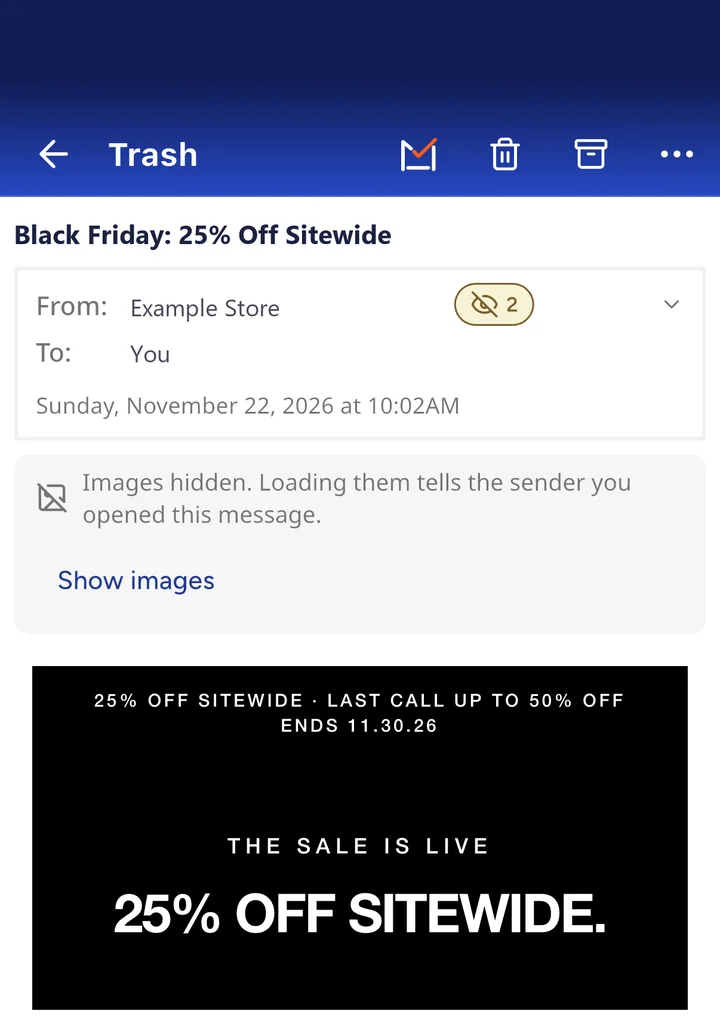
Real OptMsg screen. The privacy chip, at the top right, found 2 things in this sale email. Sender details changed.
How an email tracks you.
Most tracking happens the moment you open a message, without you doing anything.
A hidden image rides along
Many marketing emails include a tiny, invisible image, often a single pixel, stored on the sender’s server.
Opening the email loads it
When your email app shows the message, it fetches that image, and the sender’s server records the request.
The sender learns about you
Depending on your email app and its privacy settings, that can reveal when you opened it and sometimes your device or approximate location. Tagged links can add which links you tapped.
Why does it matter if someone knows you opened an email?
Opening an email shouldn’t quietly tell a sender more than you meant to share.
Your address is marked as active
An open signal tells a sender your address works and is in use, which can mean more email.
Your interests become data
Opens and clicks show which subjects and offers catch your eye.
Marketing gets more targeted
That helps senders decide what to send you next, and when.
Privacy protection built into OptMsg.
Blocks tracking pixels
Tiny hidden images that report when you open a message are blocked, so they can’t report back.
Cleans links
Links have their tracking codes (like utm_ tags) removed before you tap them. Where a link goes never changes.
Flags hidden text
Some senders hide text you can’t see, to get past spam filters or change how a message looks in previews. OptMsg flags it, keeps it out of your previews and notifications, and lets you see it with Show hidden content.
Shows you what it found
A privacy chip on a message shows how many things OptMsg found. Tap it to see each one: trackers blocked, hidden content, and every cleaned link with its original address.
Your data is not sold, shared with advertisers, or used to train AI. No ads, ever.
Tap the chip to see what it found.
This store’s sale email carried a tracker and some hidden text. OptMsg blocked the tracker, flagged the hidden content, and listed both when the chip was tapped.
Tap any line to see the details.
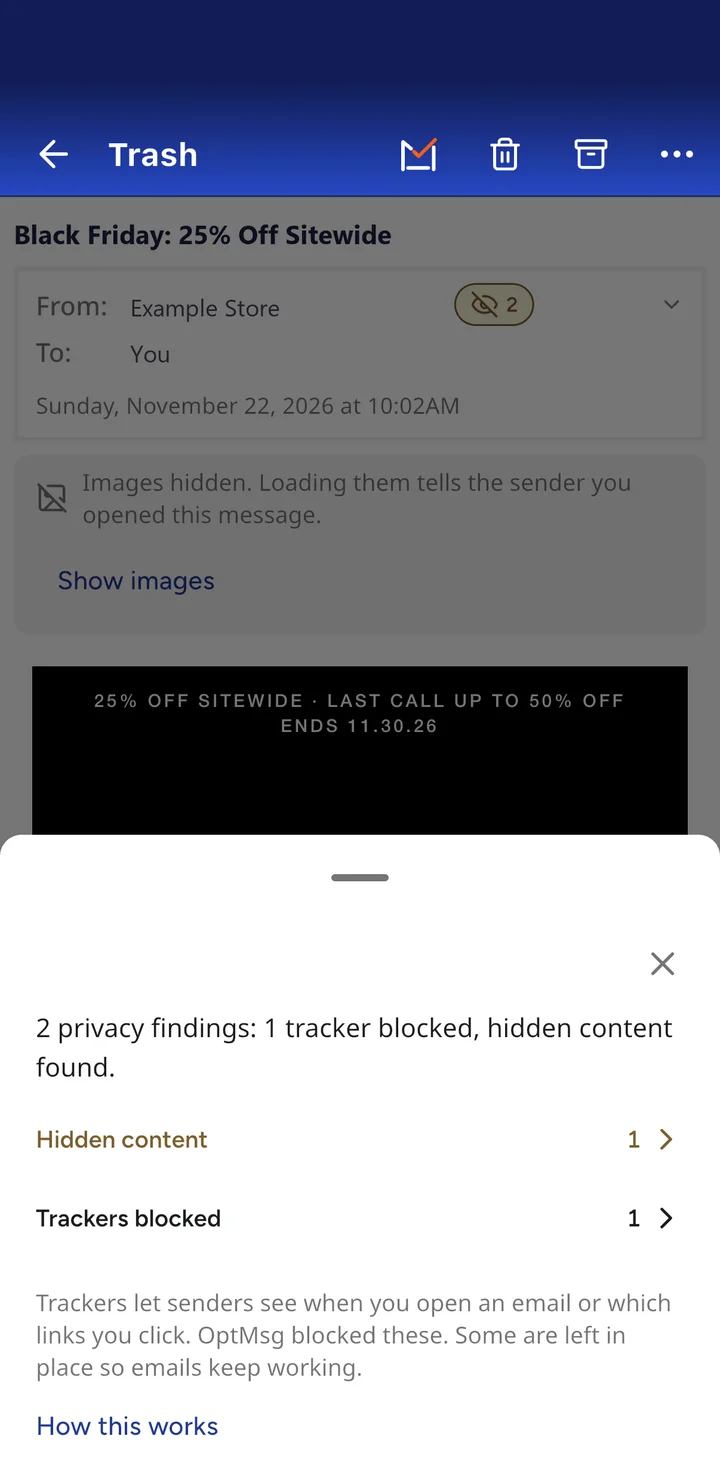
Real OptMsg screen. Sender details changed.
Your scorecard keeps count.
The Trackers & Hidden Content card on your scorecard shows how often senders tried to track you or hide text from you, and that OptMsg blocked or flagged each one.
The card counts different kinds of findings (trackers blocked, links cleaned and hidden content flagged), so the total can be higher than the number of emails.
In the example account shown, trackers turned up in 48% of incoming email over 30 days. That’s one account, not a typical result.
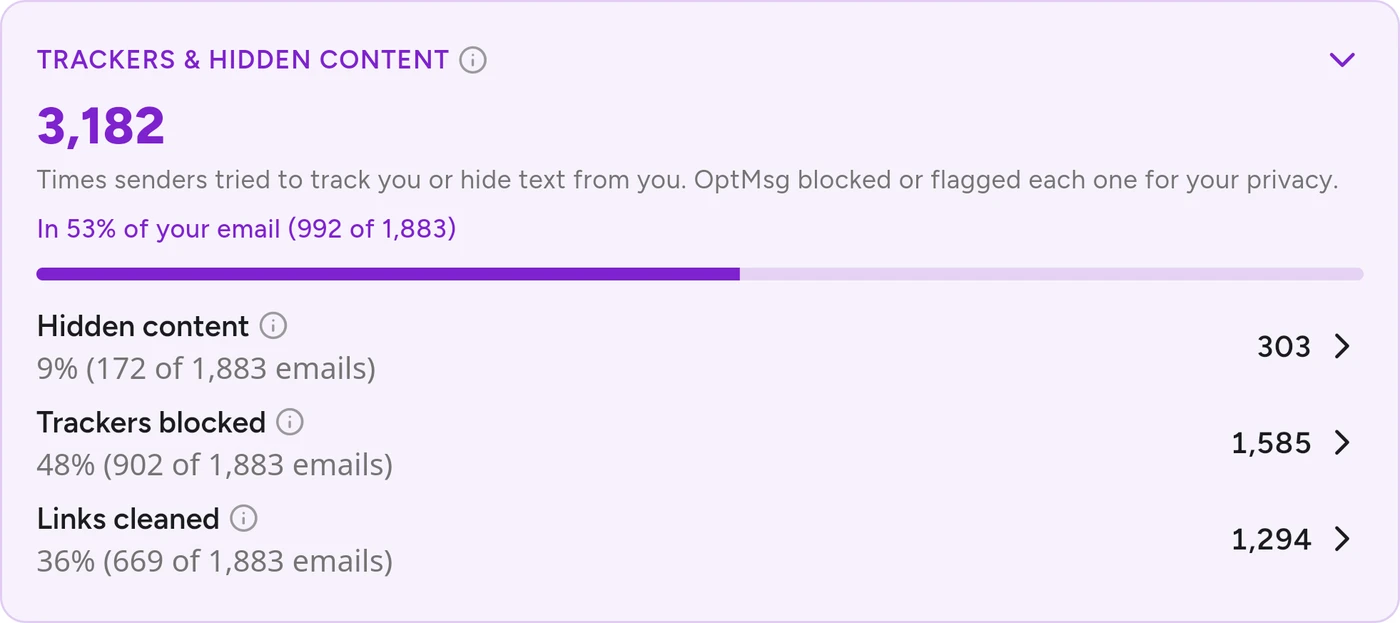
Scorecard from an example account, last 30 days. Your numbers will vary.
Common questions
Will my emails still look right?
Yes. OptMsg removes the invisible tracking pixels, which you’d never see anyway, and leaves the images you can see in place, so emails look as intended.
Can I see what was blocked?
Yes. A privacy chip on a message shows how many trackers OptMsg blocked. Tap it to see each one, along with every cleaned link and its original address.
What is hidden text in an email?
Text a sender hides from view, often to slip past spam filters or change what shows in a preview. OptMsg flags it, and Show hidden content lets you see it. Read more about hidden text in email.
Does a tracker still work if I tap a link?
Tracking codes are removed from links before you tap them, but some links pass through the sender’s own link service first, so tapping one can still tell the sender you clicked.
Does OptMsg sell my data or show ads?
No ads, ever. Your data is not sold, shared with advertisers, or used to train AI. OptMsg does not scan your emails to sell ads.
Learn what else OptMsg can do.
Your Inbox. Your Rules.
Only people you approve reach your Inbox. Everyone else goes to Trash. No ads, and hidden trackers blocked.
Keep your current email while you switch at your own pace.